To perform a bulk de-enroll:
- Select the students that you will de-enroll
- Click the Bulk Actions drop down and select Remove student(s) from course X
- Click Apply
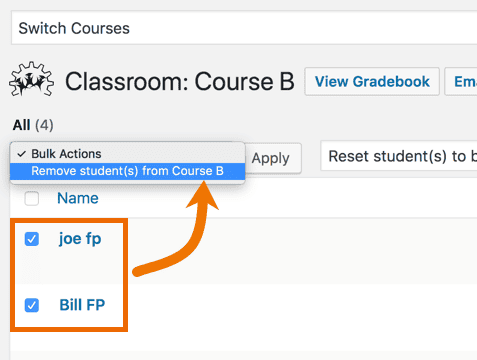

To perform a bulk de-enroll:
Please fill out the form below and we will be in contact shortly. Thank you!
[ninja_form id=20]
We use cookies to improve your experience on our site. By using our site, you consent to cookies.
Websites store cookies to enhance functionality and personalise your experience. You can manage your preferences, but blocking some cookies may impact site performance and services.
Essential cookies enable basic functions and are necessary for the proper function of the website.
These cookies are needed for adding comments on this website.
Google reCAPTCHA helps protect websites from spam and abuse by verifying user interactions through challenges.
These cookies are used for managing login functionality on this website.
Stripe is a payment processing platform that enables businesses to accept online payments securely and efficiently.
Service URL: stripe.com (opens in a new window)
Statistics cookies collect information anonymously. This information helps us understand how visitors use our website.
Clicky is a real-time web analytics platform that provides insights into website traffic and user behavior.
Service URL: clicky.com (opens in a new window)
Google Analytics is a powerful tool that tracks and analyzes website traffic for informed marketing decisions.
Service URL: policies.google.com (opens in a new window)
Marketing cookies are used to follow visitors to websites. The intention is to show ads that are relevant and engaging to the individual user.
Facebook Pixel is a web analytics service that tracks and reports website traffic.
Service URL: www.facebook.com (opens in a new window)
X Pixel enables businesses to track user interactions and optimize ad performance on the X platform effectively.
Service URL: x.com (opens in a new window)
You can find more information in our Cookie Policy and Privacy Policy.