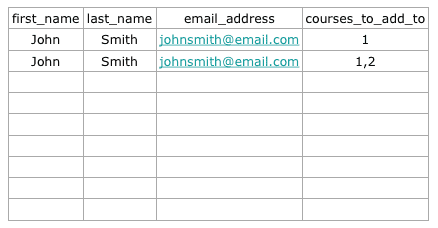
To perform a bulk user import:
- Navigate to WP Courseware→Tools, click the Import tab and then click the Users submenu item.
- Click the example CSV file link to download a sample file. WP Courseware creates it with your own course IDs.
- Fill in the CSV file, choose it, and click Import Users.
There are only four headings that are valid:
- first_name – First Name
- last_name – Last Name
- email_address – Email Address
- courses_to_add_to – Course IDs that the student will be enrolled into. To enroll a student in several courses, separate the course IDs with commas.
If a row’s email address already belongs to a user on your site, that existing user is enrolled; no duplicate account is created.